
New


Pussycat – ARK Ascended
From 4.99$
🔥 14sold in last 16 hours
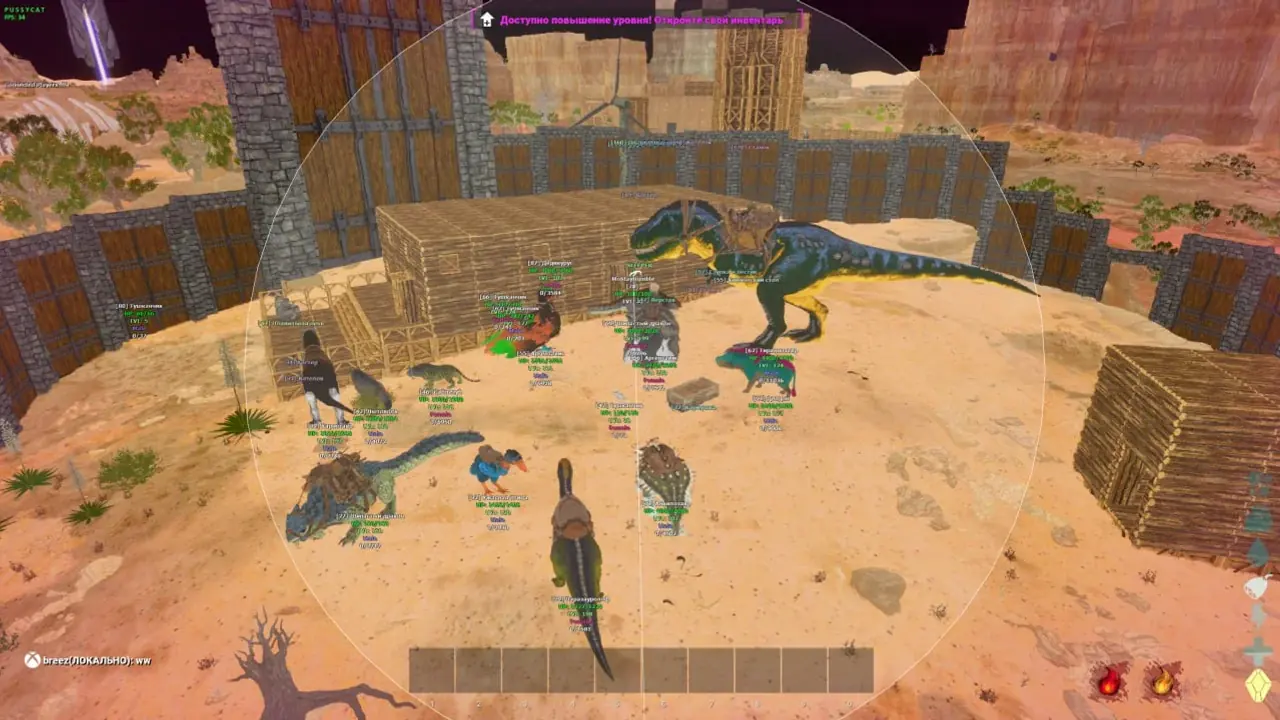
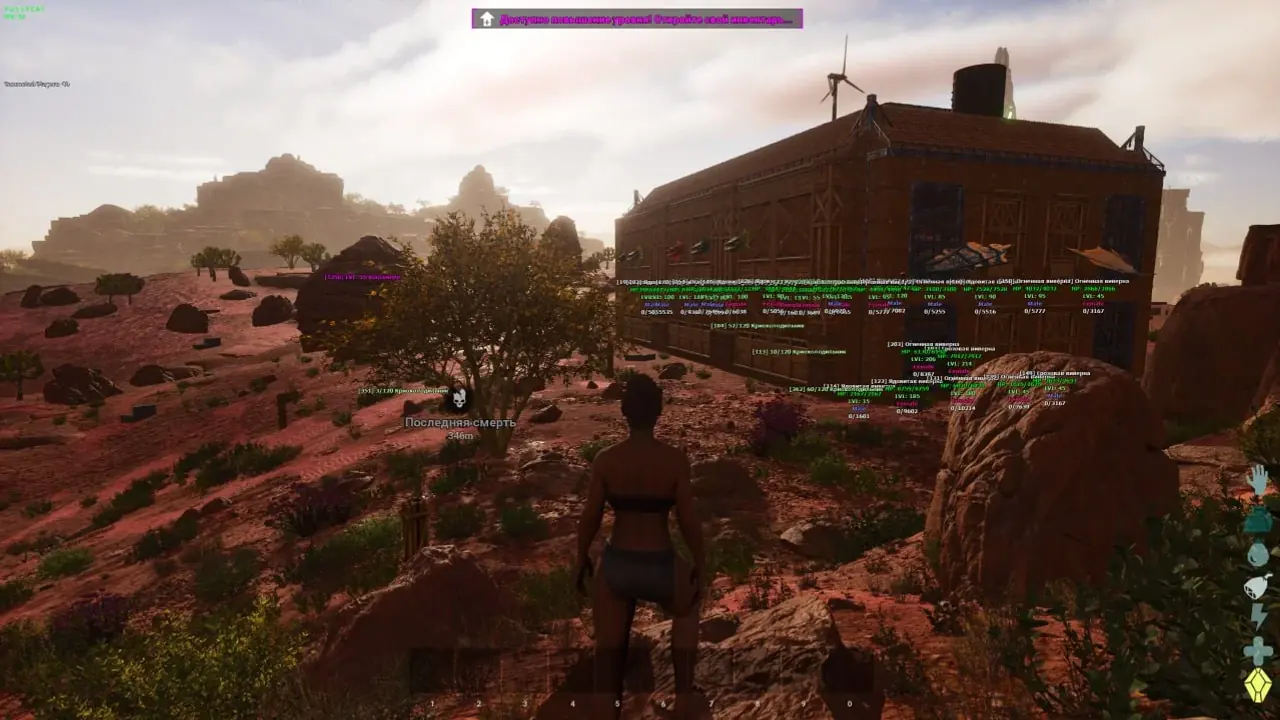
Pussycat for ARK Survival Ascended combines a configurable vector a1mbot with detailed player, dinosaur and loot ESP. Track structures and inventories, customize weapon control and use radar to navigate your surroundings.
🌐 STATUS: ✅ Undetected
- AIM, ESP, RADAR, COLORS, MISC
- Full Features Lists in below description section
System requirements:
Launcher: Steam, Epic Games, Microsoft Store (Xbox Game Pass PC)
Supported processors: Intel, AMD
Video card: Nvidia & AMD
Supported OS: Windows 10, Windows 11
Declaimer: We are not developing this software and we are a premium reselling service. We at ezMod do not advise or condone in any way, shape, or form the usage of any software sell from our shop in online gaming.
👁️🗨️ 24people are viewing this right now
Work in progress! The actual Software may have more/less features than displayed below. We will do our best to update it fully in the near future.
Pussycat – ARK Survival Ascended: Full Features List
a1mbot
- Vector Aimbot – type of aimbot with smooth or sudden aiming at target
- Enable – toggle on/off the aimbot
- Targets – select targets for aiming (players, dinosaurs)
- Aim Key – activation key for the aimbot
- Draw FOV – display the aimbot’s field of view (FOV) as a circle
- FOV Color – color of the aimbot’s FOV circle
- Filled FOV – fill the circle for better visibility
- FOV – aimbot’s working area
- Lock Target – lock aim on a target while the aim key is active
- Hitboxes – select bone(s) for the aimbot to hit (head, body, etc.)
- Max Distance – maximum range of the aimbot
- No Shake – disable weapon recoil effect
- No Spread – make all bullets hit the same point
- No Sway – remove weapon sway
- No Zoom – disable zoom scope
- Fast Scope – instant aiming or scoped view
- Prediction – takes into account the movement of players and dinosaurs when calculating lead, improving shooting accuracy
- Projectile Calculation – automatically determines the projectile’s flight speed and the influence of gravity based on the weapon used
Players ESP
- Enable – turn on ESP for players
- BOX – display players with box outlines
- Box Style – appearance of boxes (corners, solid boxes)
- Snaplines – draw lines to players
- Snaplines Style – style of ESP lines
- Skeleton – display player skeletons
- Health – show HP as text and bar
- Show Level – display player level
- Server Name – show server name
- Steam Name – display Steam nicknames
- Ignore Sleepers – hide sleeping players
- Show Dead – display bodies of killed players
- Rider – displays players riding dinosaurs
- Max Distance – ESP visibility range for players
Dino ESP
- Enable – turn on ESP for dinosaurs
- 3D Boxes – displays volumetric 3D boxes around dinosaurs (taking into account their size, rotation, and scale)
- Snaplines – draw lines to dinosaurs
- Health – show dinosaur HP as text
- Show Level – display dinosaur level
- Show Name – display dinosaur name
- Show Gender – show dinosaur gender
- Only with Rider – display only tamed dinosaurs
- Torpor Points – display dinosaur torpor (stun) progress
- Show Dead – display dead dinosaurs
- Filter Level – display only dinos above a certain level
- Max Distance – range of dinosaur ESP
Items ESP
- Show Items – enable item ESP
- Supply Level Filter – show only items of certain quality/level
- Inventory Count – show item stack size
- Max Distance – display range of items
- Names – show item names
- Storages – display loot boxes and storage containers
- Turrets – display turrets (configurable)
- Building – show structures for bases (fireplaces, grills, cryo chambers, beds, etc.)
- Tek Structures – display Tek objects (replicator, transmitter, teleporter, etc.)
- Workbench – show workbenches
- Traps – display traps
- Explorer Notes – show explorer’s notes
Other Pussycat Ark Ascended Features
- Radar – separate window showing players/dinosaurs on radar (configurable)
- Crosshair – customizable crosshair at screen center
- Online Players – display current online player count
- Combat Graphics – enable simplified graphics for combat (bindable)
- Ghost Mode – enable ghost (noclip) mode (bindable)
- Configs – quick load/save settings system
- Menu Key – assign custom key to open menu
- Custom ESP Colors – fine-tune appearance of ESP elements
- Ghost Photo Mode – enables a free camera mode for viewing the surrounding area
| Choose License: | 1 Day, 7 Days, 30 Days |
|---|
Brand
Pussycat
Only logged in customers who have purchased this product may leave a review.
Related products

From 5.99$

From 4.99$
From 4.99$


Reviews
There are no reviews yet.