
Ghost – ARC Raiders
From 13.17ر.س
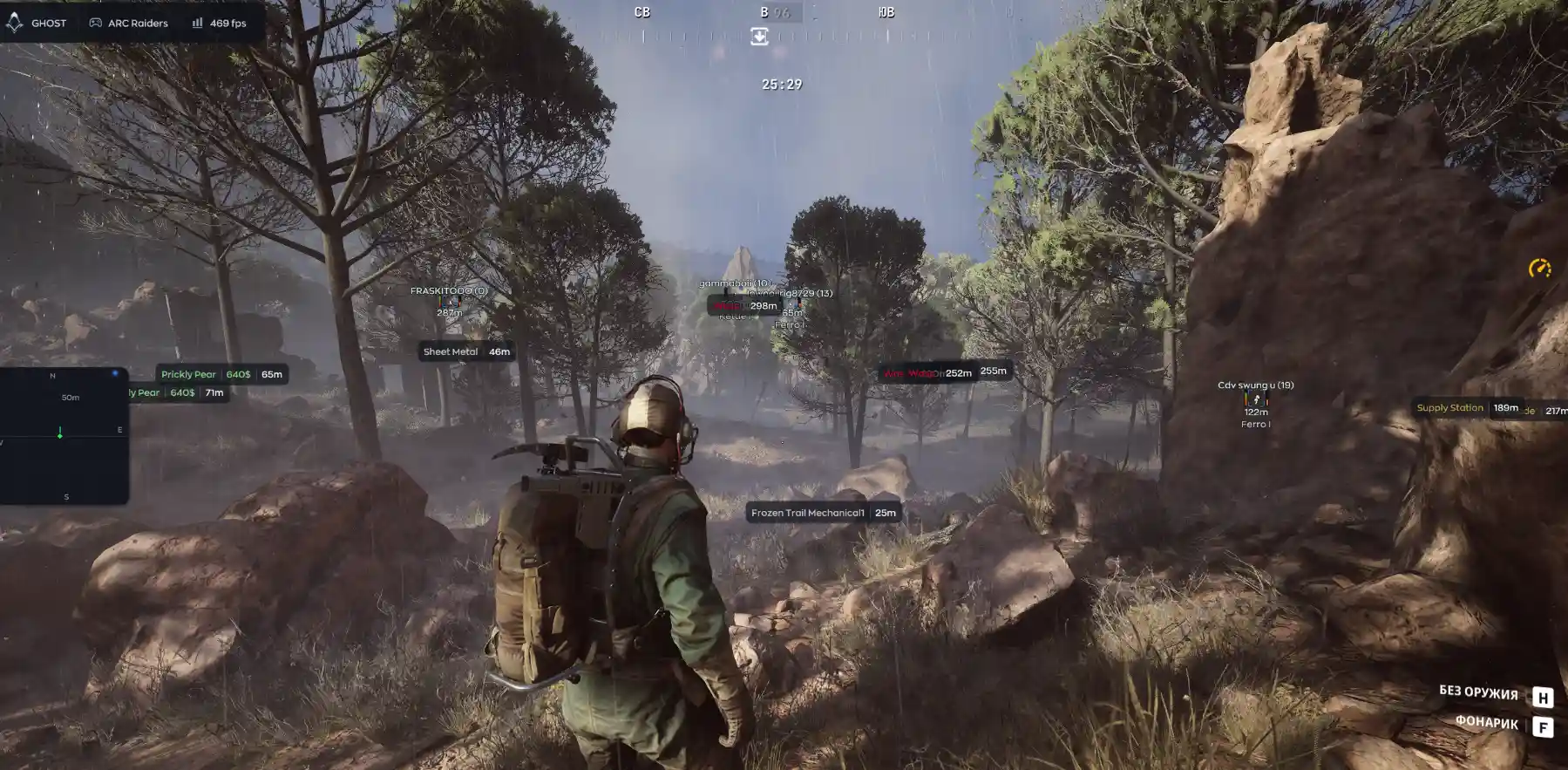
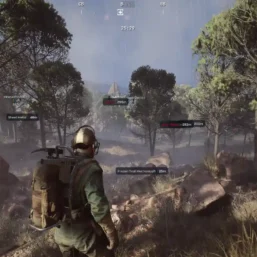
Arcane for ARC Raiders a tactical gameplay suite featuring advanced Aimbot customization, detailed player visuals, a configurable radar, rarity-based loot tracking, and comprehensive detection for drones, containers, and world objects, alongside weapon modifiers, Battle Mode, custom overlays, profile management, and an integrated AI assistant.
🌐STATUS : ✅ Undetected
- AIM, ESP, RADAR, COLORS
- Full Features Lists in below description section
System requirements:
Supported Launcher: Steam
Supported processors: Intel, AMD
Supported OS Build : Windows 10-11 x64 (21H2, 22H2, 23H2, 24H2, 25H2, 26H1)
Declaimer: We are not developing this software and we are a premium reselling service. We at ezMod do not advise or condone in any way, shape, or form the usage of any software sell from our shop in online gaming.
Work in progress! The actual Software may have more/less features than displayed below. We will do our best to update it fully in the near future.
Ghost – ARC Raiders : Full Features Lists
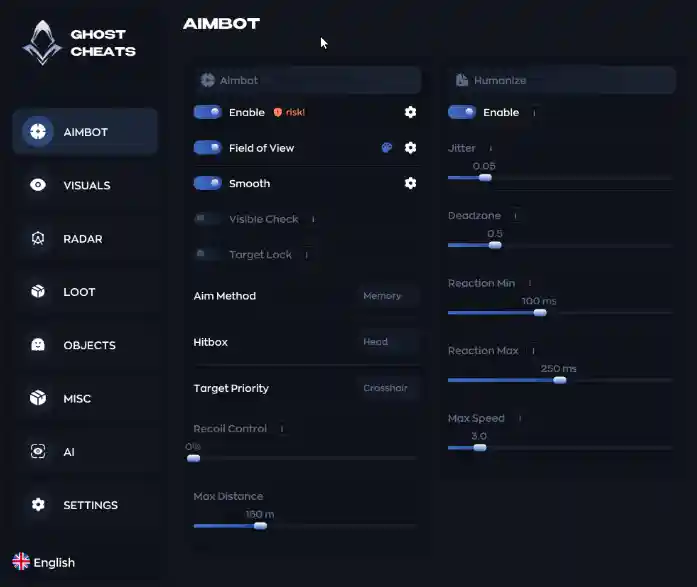
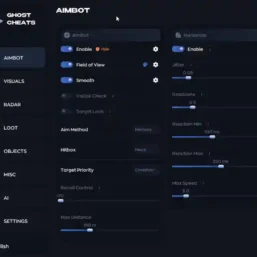
- AIMBOT
- Enable — Activates the aimbot.
- Field of View — Sets the viewing angle within which the aimbot reacts.
- Smooth — Adjusts aiming smoothness (higher values make it less noticeable).
- Visible Check — Fires only at visible targets.
- Target Lock — Locks onto a target until it is eliminated.
- Aim Method — Selects the aiming method (Memory / Mouse).
- Hitbox — Selects the body part to aim at (head, chest, etc.).
- Target Priority — Sets target selection priority (e.g., closest to the crosshair).
- Recoil Control — Compensates for weapon recoil.
- Max Distance — Limits the operating range.
- Enable — Enables aim movement humanization.
- Jitter — Adds slight tremors/oscillations to simulate hand shake.
- Deadzone — A dead zone where the aimbot does not adjust the crosshair.
- Reaction Min / Max — Minimum and maximum reaction delay before aiming begins.
- Max Speed — Maximum crosshair movement speed.
VISUAL
- Enable — enables visual cues.
- Visible Check — shows only visible players.
- Box — draws a box around the model.
- Skeleton — displays the model’s skeleton.
- Name — shows the player’s name.
- Distance — distance to the target.
- Snapline — line from the player to the target.
- Offscreen Arrows — arrows pointing to off-screen enemies.
- Health — health indicator.
- Player Status — player state (alive, wounded, etc.).
- Weapon — target’s current weapon.
- Team ID — team affiliation.
- Armor Bar — armor level.
RADAR
- Enable — turns on the radar.
- Draw Outline / Draw Background — radar styling.
- Point Style — marker shape (circle, square, triangle).
- Size — radar size.
- Max Distance — detection range adjustment.
- Point Size — marker size.
- Zoom — scale.
- Compass Bar — enables the compass bar.
LOOT
- Enable — toggles loot display.
- Common / Uncommon / Rare / Epic / Legendary — filters based on item rarity.
- The list on the right shows specific items (e.g., Equalizer, Dolabra, Aphelion Rifle, etc.) along with their value.
OBJECT
- Drones — displays drones (types: Wasp, Hornet, Rocketeer, Pop, Fireball, Tick, Turret, Sentinel, Snitch, Bastion, 1Spotter, Leaper, Surveyor, Queen, Bombardier, Shredder, Matriarch, Firefly, Comet, Vaporizer, Turbine).
- Containers — displays containers (Lockers, Crates, Furniture, Dumpsters, Plants, Vehicles, Weapon Cases, Shelves, Cabinets, Electronics, Servers, Wall Panels, Bags, Other, Raider Cache, Special).
- World — environmental objects (Mine, Hatch, Supply, Fuel Cell, Puzzle, Field Crate, Barricade, Grenade).
- Corpse — displays enemy corpses.
MISC
- Weapon — section for weapon settings.
- No Recoil — removes weapon recoil.
- No Spread — removes bullet spread.
- Rapid Fire — increases firing speed.
- Flashlight Color — changes the flashlight color.
SETTING
- Config System — create, save, and load configurations.
- Create / Delete / Save / Load / Export / Import — configuration management.
- Watermark — displays the cheat’s logo/watermark on the screen.
- Keybind Indicator — displays a panel showing assigned hotkeys.
- Shadow Text — enables text shadows (menu/ESP) for better readability.
- Battle Mode — combat mode (quickly hides unnecessary UI elements for a cleaner view).
- Crosshair — displays a custom crosshair overlay.
- Menu Key — hotkey to open the menu.
- DPI Scale — UI scaling.
AI CHAT
- AI Assistant — a chat window with a built-in AI that answers questions about cheat settings.
| Choose License: | 1 Day, 7 Days, 30 Days |
|---|
Brand
Ghost
Only logged in customers who have purchased this product may leave a review.
Related products





Reviews
There are no reviews yet.