


Arcane – PUBG

From 2.99$
🔥 8sold in last 12 hours
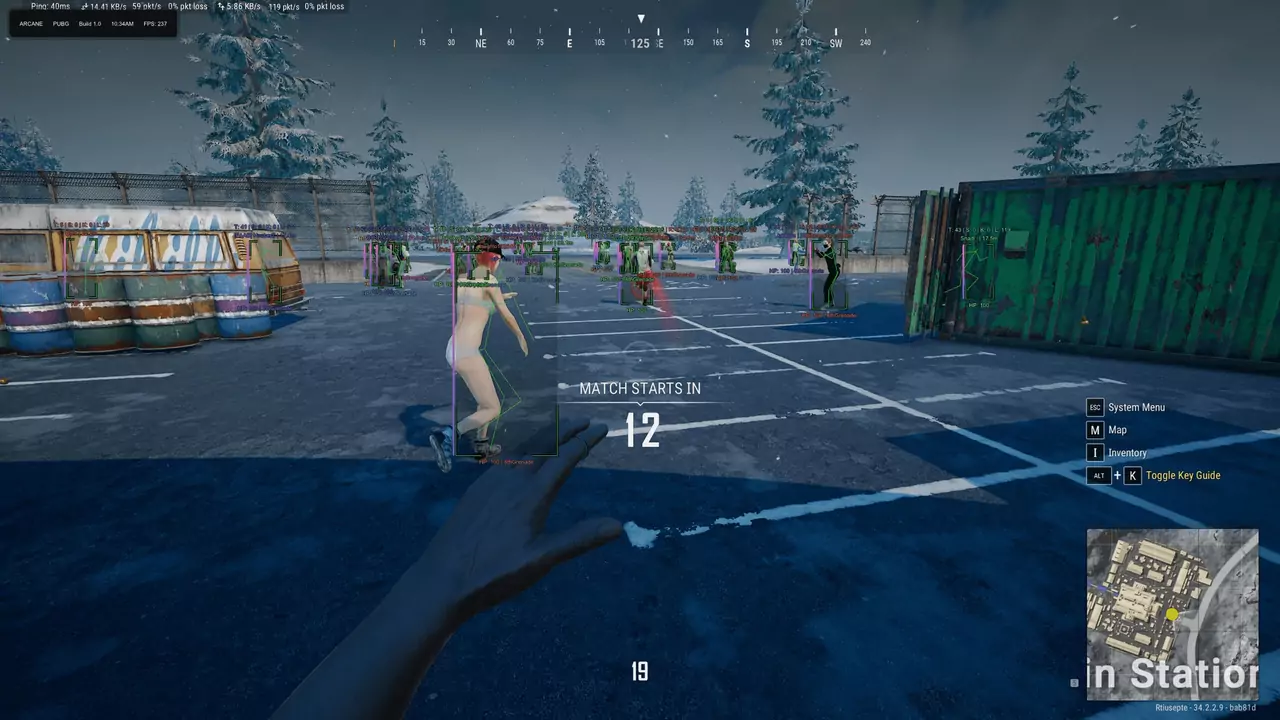
Arcane PUBG is an extremely legit and reliable solution with a low ban probability for PUBG Battlegrounds from the Arcane developer.
🌐STATUS:
FULL: ✅ Undetected
ESP: ✅ Undetected
RADAR: ✅ Undetected
- Full / ESP / Radar Version Available
- Full Features Lists in below description section
Software Info:
Type: External, Built-in Spoofer Included
Game Mode: Windowed/Borderless (Stream Proof)

System requirements:
Supported Launcher: Steam, Kakao
Supported processors: Intel, AMD
Supported OS Build : Windows 10-11 x64
Declaimer: We are not developing this software and we are a premium reselling service. We at ezMod do not advise or condone in any way, shape, or form the usage of any software sell from our shop in online gaming.
👁️🗨️ 28people are viewing this right now
Work in progress! The actual Software may have more/less features than displayed below. We will do our best to update it fully in the near future.
Arcane – PUBG : Full Features Lists
PUBG FULL Features
Aimbot (AIM)
- Enable Aimbot – enable/disable Aimbot
- Aim Type – the mode of operation of the aimbot (always, when pressed)
- FOV – Aimbot working radius
- FOV Style – the display style of the aimbot circle
- FOV Adaptive – dynamic FOV depending on
- Smooth – smoothing of AIM movements
- Distance – Aimbot working distance
- Bone – target point for Aimbot (head, neck, body)
- Prediction – predicts the movement trajectory of targets
- Lock Target – Aim focuses on the active target until it is destroyed
- Recoil Control System (RCS) – recoil control system
- No Sway – removes weapon sway (only when aiming)
- Aim Knocked – aims at knocked enemies
- Prediction cross – adds a trajectory marker on the screen
- Draw FOV Circle – displays the Aimbot working radius
- Visibility Check – checks if the enemy is visible in the field of view
- Perfect Visibility Check (Raycast) – accurately checks target visibility using Raycast
- Vehicle Wheel Aiming – allows you to aim at a vehicle’s wheels
- Sway – adds a sway setting when aiming
- Visible Mesh – allows you to aim at the nearest visible bone of the target
- Molotov Aimbot – aims Molotovs taking into account the flight trajectory
- Panzerfaust Aimbot – a separate tab with aim settings for the Panzerfaust
- Silent Aimbot – stealthy targeting without moving the crosshairs
- Silent HitChance – adjusts the hit chance for silent aim
- Weapon Skin Changer – allows you to change weapon skins
- Multi Bone – allows you to select multiple bones for targeting at the same time
- Humanization – adds more natural aiming with a strength setting
- Target Switch Delay – adjusts the delay when switching between targets
- Target List – combines available targets into a single list
Triggerbot
- Trigger Bot – automatic shooting at the target with separate settings for each weapon class
- Prediction – predicts the target’s movement and displays the lead point and barrel circumference.
- Hit Zones – allows you to select the hit zone (any bone, head, head + body).
- Visibility Check – triggers only on visible targets.
- Reaction Delay – adjusts the reaction delay before firing.
- Hold Time – adjusts the time to hold the shot.
- Cooldown – adjusts the delay between triggers.
- Model Depth – adjusts the depth of the target model check.
Players ESP (Wallhack for players)
- 2D Boxes – enable Wallhack for players in the form of boxes
- Box Fill – fills boxes with a background color for better visibility
- Nickname – shows the nicknames of players
- Visibility Check – players in the line of sight are highlighted in a different color
- Skeleton – displays the skeleton ESP
- Head Dot – shows a highlighted point on the players’ heads
- View Line – the direction of the players’ view
- Weapon – current weapon in the enemy’s hands
- Ammo Count – current ammo count in the enemy’s magazine
- Level – shows the current level of players accounts
- Show Knocked – displays knocked players
- Spectator Count – shows the number of spectators watching your game
- Kill Count – show the number of kills of players
- Team ID – shows the team number
- Team Colors – displays team colors in the game
- Equipment – displays the current equipment of the player
- Distance – distance to players
- Snaplines – esp lines to players
- Render Distance – players esp range
- Off-Screen Arrows – directional arrows pointing to enemies outside the field of view
- Perfect Visible Check – shows every visible part of the body on skeletons/boxes
- Last Dormant Players Position – displays the last position of players after they transition to an unknown state
- Knocked Health – displays the knocked player’s health as text
- Knocked Health Bar Style – allows you to choose the style of the bar (static, HP color, gradient)
- Helmet Durability – displays the helmet’s durability as a separate bar on the left
- Vest Durability – displays the vest’s durability as a separate bar on the right
- Armor Level Colors – changes the color of the armor bars depending on the equipment level
- Helmet & Vest Colors – allows you to separately adjust the colors of the helmet and bulletproof vest for levels 1, 2, and 3
- Armor Level & Durability – displays the armor level and remaining durability in separate lines
- Text Scaling – adjusts the text size
- Damage Indicator – shows the damage dealt as a numerical value above the player
World & Loot ESP
- Weapons – displays weapons (rifles, sniper rifles, SMGs, machine guns, etc.)
- Attachments – displays weapon modules (sights, silencers etc.)
- Equipment – show helmets, body armor and backpacks
- Meds – show first aid kits, bandages and boosts
- Ammo – show ammunition for weapons
- Categories – filters for displaying items (weapons, ammo, buffs, etc.)
- Vehicles – enable/disable vehicle display
- Vehicle Info – shows vehicle information (fuel, HP level, distance)
- Airdropds – show location of airdrops
- Corpses – show crates of killed players
- Drop Contents – show container contents (airdrop, corpses)
- Distance – show the distance to the object
- Render Distance – range for ESP on loot and objects
- Smart Loot – smart filter, displaying only relevant items
- Key Card – display access cards
Projectile ESP
- Projectile ESP – displays flying and landed projectiles
- Projectile Indicators – adds projectile indicators with a timer ring and the remaining time until the explosion
- Frag Grenade – separate display settings and colors for the fragmentation grenade
- Flash Grenade – separate display settings and colors for the stun grenade
- Molotov – separate display settings and colors for the Molotov
- Smoke Grenade – separate display settings and colors for the smoke grenade
- Blue Zone Grenade – separate display settings and colors for Blue Zone
- Danger Zone – displays the danger zone around a landed grenade
Projectile Exploits
- Projectile Exploits – a tab with settings for each type of grenade.
- Trajectory Display – displays the trajectory of Frag, Flash, Molotov, Smoke, and Blue Zone grenades, taking into account bounces and rolling.
- Blast Zone – displays the grenade’s impact zone with the following statuses: HIT, KILL, COVER, FIRE, ZONE, and FLASH.
- Display Mode – allows you to select the display mode (line only, zone only, or both).
- Trajectory Color – adjusts the color of the trajectory line.
- Zone Color – adjusts the color of the affected zone
- Auto Release – automatically releases frag and flash grenades
- Throw Assist – helps you choose the moment and direction for throwing a grenade
- Release Hint – shows a hint (hold, release, or late)
- Only When Aiming – activates functions only while aiming
- Aim Guide – shows the camera’s aiming direction for throwing
- Target Lock – locks the selected target during grenade throw preparation
- Next Target Hotkey – allows you to switch the target using a separate key
- Target Distance – adjusts the distance for selecting targets
Radar Hack
- Big Map Radar – adds a radar to the big map
- Minimap Radar – adds a radar to the minimap
- Player Nicknames – displays players’ nicknames on the map
- Viewing Direction – shows the direction players are facing
- Team Numbers – displays players’ team numbers
- View Direction Lines – displays lines showing the direction players are facing on the map
- Projectile Radar – displays projectiles on the mini‑map and the large map
- Projectile Type Colors – allows you to customize the colors of different projectile types
- Effect Radius – displays the range of the projectile
- Seconds Left – shows the remaining time until the projectile explodes
Other Features of PUBG Arcane FULL
- Grenade ESP – show activated grenades, their timers, and explosion radius
- Colors – allows setting custom colors for displaying various objects
- Notify Position – notification display corner
- Crosshair – displays a custom crosshair on the screen
- StreamProof – protection from recording (the software is not visible on streams, screenshots, and video recordings)
- Languages – the cheat supports multiple languages (Russian, English, Chinese)
- Battle Mode – hide unnecessary visual elements to focus on gunfights
- Panzerfaust Prediction – displays the predicted trajectory of the Panzerfaust on the minimap
- Mortar Prediction – displays the predicted trajectory of a mortar shell on the minimap
- No Recoil – disables weapon recoil
- Recoil Compensation – allows you to adjust the recoil compensation percentage
- Any Device – ability to open the map on any device (second monitor, laptop, tablet, or smartphone)
- Browser Access – opens the radar directly in the browser
- Share Radar Link – allows sharing the radar link with friends
- Steam Overlay Support – supports opening the radar through Steam Overlay during the game
- Cross-Device Access – allows opening the radar from any other internet‑connected device
PUBG RADAR Features
Players
- Players – display players on the radar
- Show Team – display all teammates or only selected squad members
- Team Number – display the player’s team number
- Team Color – set the team color on the radar
- Nickname – display the player’s nickname
- Distance – display the distance to the player
- Weapon Name – display the player’s weapon name
- Ammo Count + Is Reloading – display ammo count and reloading status
- Show Shooting Line – display player shooting direction
Vehicles
- Vehicles – display vehicles on the radar
- Show Vehicles – enable vehicle rendering
- Show Health – display vehicle durability
- Show Fuel – display vehicle fuel level
- Style – choose the vehicle display style: icon, icon with name, or name only
- Icon Size – adjust vehicle icon size
Items and Loot
- Items – display items on the radar
- Show Drops – display airdrops on the map
- Show Drop Contents On Map – display airdrop contents directly on the radar
- Style – choose the item display style: icon, icon with name, or name only
- Icon Size – adjust item icon size
- Advanced Items Filter – advanced item filter to show only desired loot
- Items Distance – display distance to the item
- Search For Nearby Items – search for items near you
- Items Nearby Table – table showing the list of items closest to you
Other Arcane PUBG Radar Features
- No Recoil – disable weapon recoil with a hotkey
- Show Local Aiming Line – display the line of your aiming direction
- Show Mortar Trajectory – display mortar shell trajectory
- Auto-Scaling – intelligent automatic map scaling based on the situation (movement speed, number of enemies, amount of nearby loot)
- Follow Local Player – center the radar on your character
- Ability To Follow Specific Team Member – ability to switch tracking to a selected teammate
- Global Player Table – global table of all players in the match with detailed information
- Stats (Level, Kills, Spectators) – display level, kills, and number of spectators
- Gear – display player gear, weapons, and armor
PUBG ESP Features
Player ESP (WH)
- 2D Player Boxes – wh in the form of boxes
- Filled Boxes – fill the background of the boxes
- ESP Style – General style of ESP
- Nickname – Players names
- Weapon – weapon in the hands of the target
- Level – player profile level
- Knocked – show knocked out enemies
- Spectators – Number of viewers at the ESP target
- Kills – number of kills of opponents
- Team ID – Players team numbers
- Skeleton – esp in the form of skeletons
- Visible Check – color players in line of sight and behind walls differently
- Lines – esp in the form of line
- Distance – distance in meters to the target
- Max Distance – ESP range
- Ammo Count – the number of bullets in the enemies’ weapons
Loot ESP (Items)
- Loot ESP – enable display of items
- Names – names of displayed objects
- Distance – distance in meters to objects
- Max Distance – range settings for different types of objects
- Weapons – display weapons, filter them by type
- Equipment – vests, backpacks, helmets
- Attachments – weapon modules
- Medicine – first aid kits, bandages, boosters
- Ammo – ammunition
- Throwables – grenades, throwing weapons
- Other Items – other loot
- Vehicle (Land, Water, Air) – various transport
- AirDrop – airdrops
- Death Drop – boxes of the dead players
- Show Content – show container contents as a list
- Vehicle Status (Fuel, Health) – fuel reserves of the vehicle, health reserves
- Custom Item Filter – select items to display to your taste
- Thrown Grenades – activated grenades, distance and time before explosion
- Smart Loot (Helmet, Vest, BackPack) – show only equipment of a higher level than you are wearing
Misc (Other features of Arcane PUBG ESP)
- Configs (Create, Delete, Save, Load) – the ability to save settings in configs and manage them
- Spectator Count – counter of people watching you
- Menu Style – settings visual style menu cheat arcane pubg esp
- Custom Colors – colors for most visual features to your taste
- Battle Mode – bind that when pressed disables all WH except players
- GUI Scale – interface scale
- Crosshair – static sight in the middle of the screen
- Arrows – arrows pointing towards players out of field of view
- Language (Russian, English, Chinese) – arcane pubg esp menu available in 3 languages
- StreamProof – the software is completely hidden in screenshots, videos and streams
- No Recoil – disable weapon recoil when shooting
| Choose License: | Radar – 1 Day, Radar – 7 Days, Radar – 30 Days, Full 1 Day, Full 7 Days, Full 30 Days, ESP 3 Days, ESP 15 Days, ESP 30 Days |
|---|
Brand
Arcane
Only logged in customers who have purchased this product may leave a review.
Related products

From 4.99$

From 5.40$
Sale!

Original price was: 38.00$.17.50$Current price is: 17.50$.

From 4.98$


Reviews
There are no reviews yet.